An AI back office for contractors
A contractor talks a job through from the truck. The quote, materials list and invoice wait for his OK.
- Client
- A general contractor
- Does
- Quotes, materials, invoices
- Works in
- His own books, supplier, calendar and email
The office is the truck
Most trade businesses are run by the person doing the work. Quotes, orders and bills get done in the truck, or at the kitchen table at night.
So quotes go out late and the customer calls someone else. Materials get guessed, and the extra supply run eats the margin.
We built an office that works the way he does. He talks, it drafts, he says go.
Lead to paid, one chat
Seven steps. Each diamond is a stop for his OK.
- 01 Lead Calls, messages, web, email
- 02 Scope A voice note or photo from the job
- 03 Estimate A draft at his rates His OK
- 04 Materials Priced at his supplier, by aisle His OK
- 05 Schedule Booked on his calendar His OK
- 06 Invoice Quote becomes invoice His OK
- 07 Paid Payment logged
What it plugs into
It works inside the tools he already has.
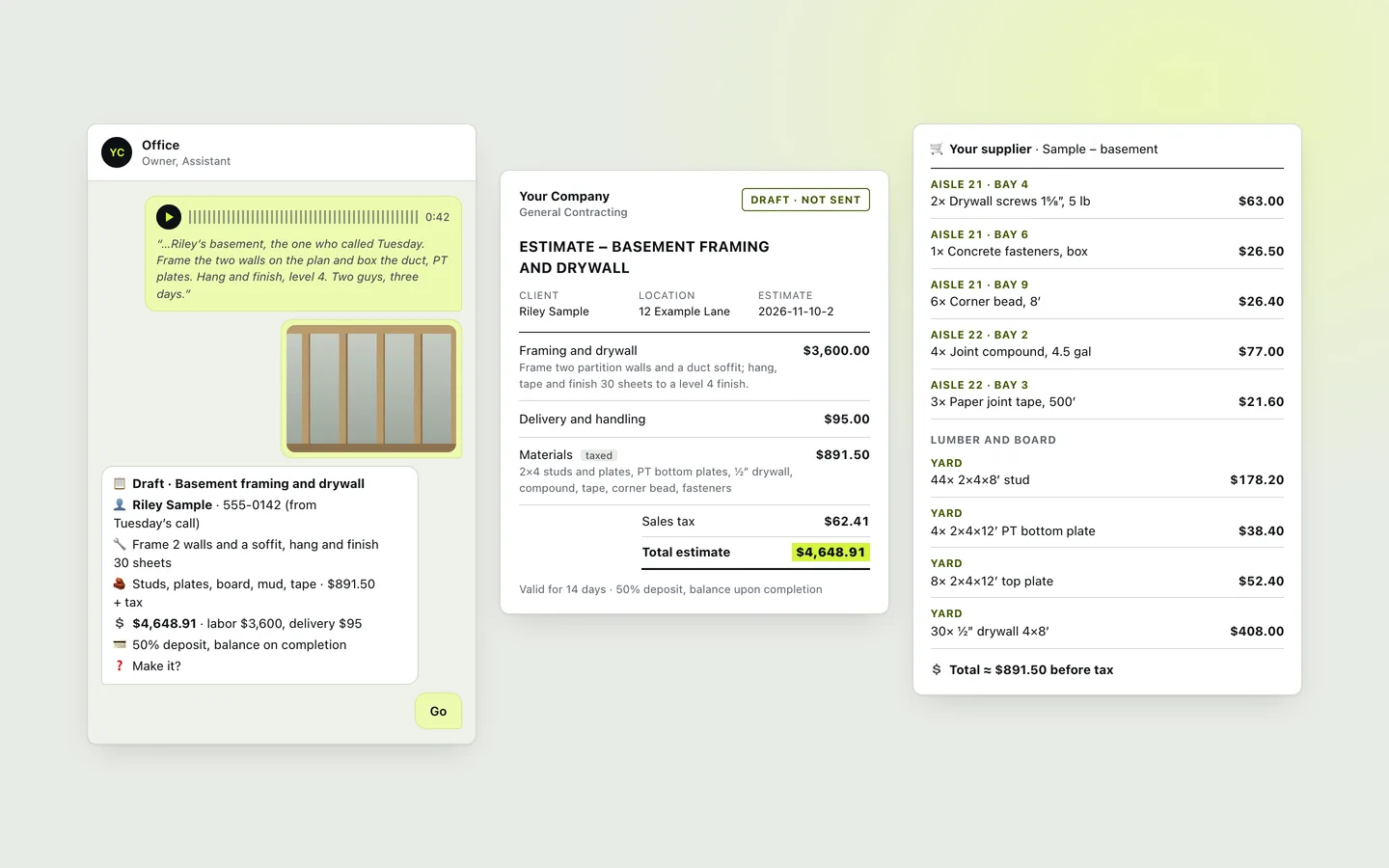
Voice note to priced job
Priced before he leaves the site. Names and numbers are made up.
📋 Draft · Basement framing and drywall
👤 Riley Sample · 555-0142 (from Tuesday’s call)
🔧 Frame 2 walls and a soffit, hang and finish 30 sheets
🧱 Studs, plates, board, mud, tape · $891.50 + tax
💲 $4,648.91 · labor $3,600, delivery $95
💳 50% deposit, balance on completion
❓ Write it up?
General Contracting Draft · not sent
Estimate – Basement framing and drywall
Valid for 14 days · 50% deposit, balance upon completion
🛒 Your supplier · Sample – basement
- Aisle 21 · Bay 42× Drywall screws 1¼″, 5 lb$63.00
- Aisle 21 · Bay 61× Concrete fasteners, box$26.50
- Aisle 21 · Bay 96× Corner bead, 8′$26.40
- Aisle 22 · Bay 24× Joint compound, 4.5 gal$77.00
- Aisle 22 · Bay 33× Paper joint tape, 500′$21.60
Lumber and board
- Yard44× 2×4×8′ stud$178.20
- Yard4× 2×4×12′ PT bottom plate$38.40
- Yard8× 2×4×12′ top plate$52.40
- Yard30× ½″ drywall 4×8′$408.00
💲 Total ≈ $891.50 before tax
He signs off on everything
His name is on every quote. So it drafts, he decides:
- Drafts only. Nothing goes out until he says send. “Looks good” isn’t send.
- His accounts. Records stay in his own books and calendar. Quit anytime, lose nothing.
- Hard limits. It can’t pay, check out, change payment details or delete mail.
- Customer info stays put. Our logs show work got done, not who it was for.
- Takes orders from him only. An email or message telling it what to do goes to him. It never acts on it. Scams get flagged.
- His word wins. When he and the customer disagree, it sides with him and tells him.
For bigger outfits
With crews and subs, it could grow like this. We haven’t built these yet.
-
Sub bids
Gathered and lined up side by side.
-
Supplier quotes and POs
Compare suppliers, draft the PO, match it to the bill.
-
Change orders
Priced on site and signed before the work.
-
Job costing
Real cost vs. estimate, while there’s time to fix it.
-
Progress billing
Pay apps drafted from the schedule of values.
-
Crews and dispatch
Each crew lead could get the day’s plan.
How we start
No new software to learn. We start with a two-week look at how you work.
- LearnHow you quote: rates, terms, the jobs that go wrong.
- ConnectWe hook up the tools you already use.
- Test runAt first we check every draft with you.
- Dial inYour changes go into the price book, so drafts get closer to yours.
You do the work. The paperwork waits for your OK.